


Free Sky Quality Meter Reader:
SQM Reader 3

No AI used in our products!
SQM Reader 3 is a free program that reads and displays data from Unihedron's Sky Quality Meters (models SQM-LE, SQM-LU, SQM-LU-DL and SQM-LR) using the Ethernet connection, USB or serial port on your computer (see Release Notes below.) Sky Quality Meters are available from Unihedron or any of its dealers worldwide.
SQM Reader 3 does not calibrate the Sky Quality Meter or alter its accuracy. Please consult your SQM User's Manual to configure the device.
SQM Reader Pro 3 adds graphing, statistical calculations, extended data storage and transmission capabilities to the basic feature set of SQM Reader, allowing you to understand how light pollution affects your dark sky over time. It also supports reading and erasing data in SQM-LU-DL, and it supports the Skyglow Standard data file format.
SQM Reader 3 is provided free of charge by Knightware, makers of SQM Reader Pro and Deep-Sky Planner. SQM Reader 3 works with 32 and 64 bit editions of Windows 10, 8 and 7.
A Knowledegebase article describes installing the COM port driver for the SQM-LU (and SQM-LU-DL).
Release Notes
SQM Reader uses your computer's Ethernet connection to communicate with the SQM-LE, or a USB port to communicate with the SQM-LU and SQM-LU-DL, or a 9-pin serial port to communicate with the SQM-LR.
SQM-LE users can read the meter over a network or use an Ethernet crossover cable to read the meter directly. The first time that you attempt to read your SQM-LE using this program, your security software may notify you that SQM Reader is attempting to access the Internet. You will need to permit the program to access the Internet to perform the reading. SQM Reader communicates only with the IP address (or host name) and port that you enter into the program.
SQM-LU and SQM-LU-DL users can read the meter using a USB cable, and SQM-LR users can read the meter using a 9-pin serial cable. Note that only live data can be read from the SQM-LU-DL. Reading the data log is not supported, but it is in SQM Reader Pro.
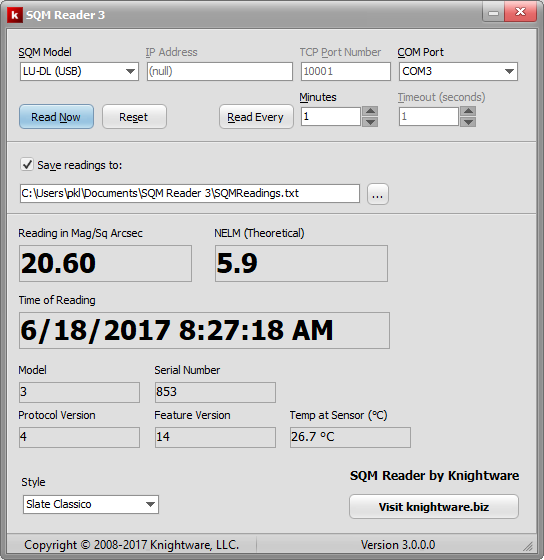
SQM Reader can be used to read a device on demand (Read Now button as shown above), or to read a device continuously every few minutes (Read Every button.) Readings can be stored in a comma separated value format file and subsequently imported into a spreadsheet program.
Windows 7 and later users will notice that when the SQM Reader is minimized to the task bar, the reading is large enough to read in the thumbnail preview that is shown when you hover your cursor over the SQM Reader task bar button.
SQM Reader ships with several skins that modify the program's appearance. It is designed to work on high resolution monitors.
Updates
There have been no updates to SQM Reader 3.