


Product Support
Please check the product's online help files: Getting Started Tutorial and Deep-Sky Planner Help. These are both available in Windows HTML Help format from the product's Help menu, and in Adobe Acrobat (PDF) format in your product's Help subfolder, and in the root folder of your product CD. You can use the full-text search capability in Windows HTML Help or Acrobat Reader to find information quickly in these exhaustive documents which currently occupy over 360 pages.Some problems (and performance issues) can be remedied by having your version of Windows updated. Please use Microsoft Windows Update to be sure your computer is up to date.
Please see the Support menu (above) for links to additional help information.
If you need further help, please contact Support.
Updates
Support and updates for Deep-Sky Planner 4 are available by logging in to the licensed users' support page below - you will need your product key to log in.
Please note that Deep-Sky Planner 4 (v4.1.0 and later) allows licensed users to log in directly to the Licensed Users' Support page from Deep-Sky Planner by using the Support on the Web feature on the Help menu. Licensed users can also check for software updates and download them if available by using the Check for Updates feature on the Help menu.
 If you own the version 4.3 CD and have had trouble installing an update using Check for Updates, please contact Support.
Log in to licensed users' support page
 A minor update (4.3.4) was released 18 March 2009. This update adds support for Redshift 7 Premium.
Having trouble logging in to licensed user's page?
If you are using Internet Explorer (IE), your Privacy settings may be interfering with the log in process - after entering your Username and Password, you may see a page that says 'You are not logged in.'
This can be remedied by temporarily changing your privacy setting for IE. In IE6 or IE7, go to Tools | Internet Options and select the Privacy tab. Make sure that your Privacy setting is 'Medium High' or below. The 'High' setting may cause problems.
Q. How do I know which version I am running?
A. Click About on the Deep-Sky Planner Help menu and locate the Build number in the lower right of the red box.
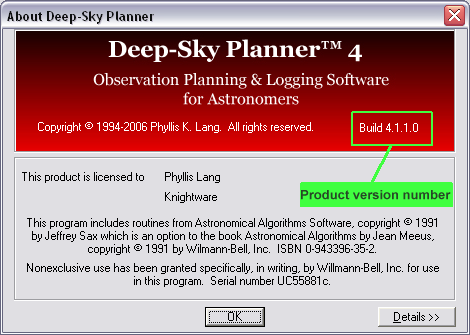 (Click to enlarge)